

KuGamer APK 2.52

Advertisement
KuGamer APK is an Android control optimization app designed for ranked play, allowing players to use keyboard and mouse input while maintaining natural and stable gameplay behavior. Built for competitive mobile gamers, KuGamer APK focuses on control precision, consistent performance, and long-term usability without altering game mechanics. With adjustable sensitivity, reliable input mapping, and a safety-first approach, KuGamer APK helps players express their skills more accurately in ranked environments such as PUBG Mobile, Free Fire, and other FPS-focused Android games.
Information of KuGamer
About KuGamer
KuGamer APK – Safe Keyboard & Mouse Control for Ranked Play
Mobile competitive gaming has changed dramatically in recent years. Ranked modes are no longer casual spaces where players experiment freely. Today, they demand accuracy, control stability, and consistent performance over long sessions. In fast-paced titles like PUBG Mobile, Free Fire, and Call of Duty Mobile, every movement, every aim adjustment, and every reaction matters.
For many players, touch controls eventually become a limitation. You may understand positioning, timing, and decision-making perfectly, yet still feel held back by control precision. This is where KuGamer APK fits naturally into the picture. It is not positioned as a shortcut or a replacement for skill, but as a control optimization tool designed specifically for ranked play, where safety and long-term reliability matter most.
KuGamer APK allows you to use keyboard and mouse input on Android while maintaining a gameplay flow that feels natural and consistent. Instead of pushing aggressive features, it focuses on stability, accuracy, and predictability. For players who value their accounts, their ranking progress, and their competitive integrity, this approach makes a meaningful difference.
What Is KuGamer APK and Who Is It Built For
KuGamer APK is an Android control-mapping application that converts keyboard and mouse input into responsive on-screen touch actions. Its purpose is simple but focused: improve how you control the game without changing how the game works.
Unlike tools designed for experimentation or short-term novelty, KuGamer APK is built for players who spend real time in ranked environments. It targets users who care about performance consistency and want a control setup they can rely on match after match.
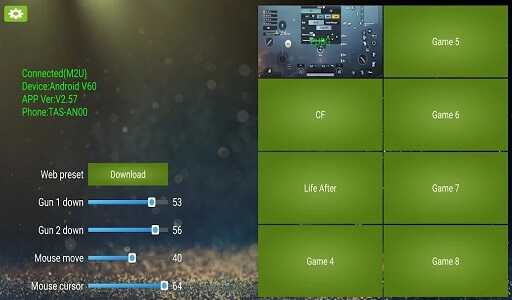
KuGamer APK is designed for:
-
Competitive mobile gamers who play ranked modes regularly
-
Players who aim to climb leaderboards through skill and consistency
-
FPS and TPS players seeking PC-style control on Android
-
Users who prefer native mobile gameplay over emulators
It is important to understand what KuGamer APK is not. It is not designed for casual testing, visual gimmicks, or frequent setup changes. Its strength lies in predictable behavior. Once configured properly, it becomes part of your routine rather than something you constantly adjust. This makes it especially suitable for players who approach ranked play with a long-term mindset.
Why Safety Is Critical in Ranked Mobile Gaming
Ranked mobile gaming carries a level of pressure that casual play does not. Player accounts often represent years of effort, unlocked content, seasonal rankings, and personal progress. Losing access to that account is not just inconvenient—it can mean losing everything you have built.
Many players hesitate before using any external control solution, and for good reason. Ranked environments are closely monitored, and unusual input behavior can quickly draw attention. Even small inconsistencies can create unnecessary risk when repeated over dozens or hundreds of matches.
Common concerns among ranked players include:
-
Stricter monitoring in competitive modes
-
Input patterns that do not match typical touch behavior
-
Limited or nonexistent recovery options once restrictions occur
For players who take ranked play seriously, the risk often outweighs curiosity. This is why safety, stability, and natural input behavior matter far more than feature count. A control solution must blend into normal gameplay patterns and behave predictably under pressure.
KuGamer APK addresses this reality by focusing on control optimization rather than system-level interference. Its design philosophy centers on long-term use, allowing players to focus on improving their performance instead of worrying about account stability.
How KuGamer APK Enables Safe Keyboard & Mouse Control
Using keyboard and mouse input in ranked mobile games requires more than just responsiveness. It requires consistency, restraint, and a clear understanding of how competitive environments operate. This is where KuGamer APK separates itself from many control-mapping solutions.
Why Most Keyboard Mapping Apps Are Risky in Ranked Games
Many control-mapping tools rely on techniques that can introduce unnatural behavior into gameplay. While these methods may work in casual settings, they often become problematic in ranked environments where consistency is closely observed.
Common risk factors include:
-
Game cloning or sandbox execution
-
Emulator-based input translation
-
Overly aggressive automation
-
Repetitive, perfectly timed input patterns
Over time, these behaviors can create gameplay that no longer resembles standard touch interaction. In ranked play, where matches are longer and patterns repeat, such inconsistencies become easier to notice.
Advertisement
Advertisement
KuGamer APK avoids these high-risk approaches. Instead of chasing complex features, it prioritizes natural input behavior and consistent control delivery, helping gameplay remain aligned with typical player interaction.
KuGamer APK’s Input Handling Explained in a Simple Way
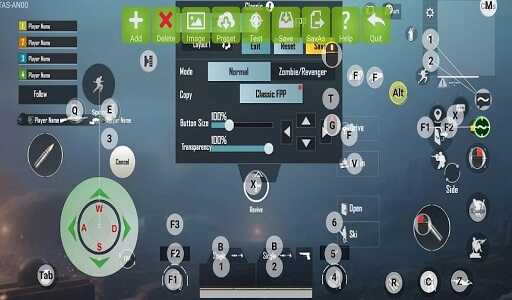
KuGamer APK works as a control layer that translates physical keyboard and mouse actions into standard touch inputs. Rather than modifying game files or altering internal processes, it focuses entirely on how input reaches the game.
This approach has several important characteristics:
-
It does not modify game logic
-
It does not change game data
-
It does not interfere with internal systems
From the game’s perspective, actions still appear as normal touch interactions. This design choice allows KuGamer APK to deliver improved control without introducing behavior that feels out of place in competitive environments.
By keeping the process simple and focused, KuGamer APK maintains stability across long sessions and multiple ranked seasons.
How KuGamer APK Maintains Natural Gameplay Behavior
Competitive games are built around human input. Reaction times vary, movement patterns change under pressure, and no two matches play out exactly the same. KuGamer APK respects these dynamics.
It maintains natural gameplay behavior by:
-
Preserving realistic input timing
-
Avoiding perfectly repetitive action cycles
-
Allowing player-controlled sensitivity tuning
This flexibility ensures that your gameplay remains fluid and responsive without appearing mechanical. In ranked matches, where stress levels fluctuate and decisions happen quickly, this natural behavior helps maintain consistency without forcing rigid patterns.
Control Optimization vs Game Manipulation: The Key Difference
A clear line exists between optimizing how you control a game and manipulating how the game operates. KuGamer APK stays firmly on the optimization side.
Control optimization focuses on:
-
Improving aiming precision
-
Enhancing movement consistency
-
Reducing physical strain during extended play
It does not involve:
-
Changing in-game mechanics
-
Altering outcomes or player attributes
-
Interfering with competitive systems
This distinction is critical for ranked environments. By focusing only on how input is delivered, KuGamer APK supports competitive integrity while still giving players the control refinement they seek.
Why KuGamer APK Is Suitable for Long-Term Ranked Play
Ranked progression is not about one good match. It is about consistency across hundreds of games. KuGamer APK is designed with this reality in mind.
It supports long-term ranked play by offering:
-
Stable performance during extended sessions
-
Predictable control behavior over time
-
No need to constantly adjust playstyle
Once properly configured, KuGamer APK becomes a reliable part of your setup. You can focus on strategy, positioning, and decision-making without re-learning controls each season. This stability is especially valuable for players who aim to improve steadily rather than chase short-term results.
Keyboard & Mouse Advantages for Ranked Matches
In ranked environments, control accuracy often determines outcomes more than raw reflexes. Keyboard and mouse input gives you a more direct connection between intention and action, which becomes especially valuable during tense engagements.
Key advantages include:
-
More precise aiming, particularly at medium and long range
-
Faster directional adjustments, useful during close-quarter combat
-
Improved camera control, allowing better tracking of moving targets
These benefits do not replace game sense or decision-making. Instead, they allow your existing skills to translate more accurately into in-game actions. With KuGamer APK, keyboard and mouse input becomes a tool for expressing control, not a shortcut to results.
Precision, Sensitivity, and Consistent Performance
Consistency is one of the most overlooked aspects of ranked play. Even small variations in sensitivity can affect muscle memory and confidence during long sessions. KuGamer APK addresses this by allowing fine-grained sensitivity tuning that adapts to your playstyle.
Proper sensitivity configuration helps you:
-
Reduce overcorrection during aiming
-
Maintain accuracy across extended play sessions
-
Avoid performance drops caused by hand fatigue
Once you find settings that feel natural, KuGamer APK allows you to maintain them reliably. This stability is critical for ranked progression, where confidence in your controls directly affects decision-making under pressure.
Advertisement
Supported Games and Competitive Use Cases
KuGamer APK is commonly used in competitive scenarios across a range of popular Android titles, especially those that emphasize aiming precision and movement control.
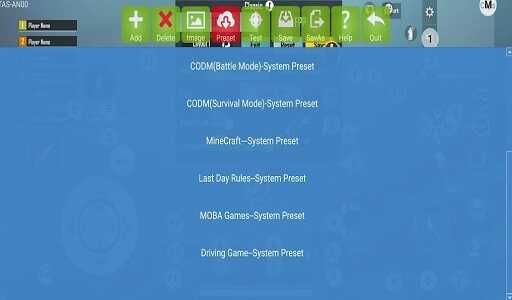
Typical use cases include:
-
PUBG Mobile ranked matches
-
Free Fire competitive modes
-
Call of Duty Mobile multiplayer and ranked play
-
Arena Breakout and similar tactical shooters
These games reward consistency, positioning, and mechanical control. KuGamer APK fits naturally into this environment by enhancing input accuracy without changing gameplay rules. For slower-paced or heavily touch-optimized titles, the benefits may be less noticeable, but for FPS-focused games, the difference is often clear.
How KuGamer APK Compares to Other Control Mapping Apps
Many control-mapping applications focus on offering as many features as possible. While this may appeal to experimentation, it often comes at the cost of stability. KuGamer APK takes a more restrained approach.
Its key points of distinction include:
-
A strong emphasis on safe, predictable behavior
-
Free access without feature locking
-
A setup process designed for consistency rather than constant tweaking
Instead of encouraging complex configurations, KuGamer APK prioritizes reliability. For ranked players, this balance often matters more than having access to experimental options that may disrupt long-term performance.
Best Practices for Using KuGamer APK in Ranked Play
To get the most out of KuGamer APK, disciplined setup and usage are essential. Ranked play rewards preparation and consistency.
Recommended practices include:
-
Testing your control configuration before entering ranked matches
-
Making small sensitivity adjustments rather than frequent major changes
-
Avoiding unnecessary automation that could disrupt natural gameplay flow
By treating your control setup as part of your competitive routine, you reduce distractions and improve focus during matches. KuGamer APK works best when it supports your playstyle quietly in the background.
Installation and Setup Guide for Safe Usage
Setting up KuGamer APK correctly from the start helps ensure a smooth experience during ranked play.
General setup steps:
-
Install KuGamer APK from a reliable source
-
Grant the required permissions during first launch
-
Connect your keyboard and mouse properly
-
Configure basic mappings and sensitivity
-
Test controls in non-ranked modes before competitive use
Spending a few extra minutes during setup can prevent frustration later. A well-prepared configuration allows you to enter ranked matches with confidence.
Who Should Use KuGamer APK for Ranked Play
KuGamer APK is best suited for players who approach mobile gaming with a competitive mindset.
It is ideal for:
-
Players focused on long-term ranked progression
-
FPS and TPS gamers who value control precision
-
Users who want stable keyboard and mouse input on Android
It may not be the right choice for:
-
Casual players who play occasionally
-
Short-session experimentation
-
Users unwilling to spend time configuring controls
For the right audience, KuGamer APK becomes a dependable part of a competitive setup rather than a temporary experiment.
Conclusion
KuGamer APK is built around a simple but important idea: improve how you control the game without changing how the game works. For ranked-focused mobile gamers, this distinction matters. Control consistency and account stability are far more valuable than aggressive features or short-term experimentation.
By focusing on natural input behavior, stable performance, and long-term usability, KuGamer APK supports a cleaner competitive experience. Keyboard and mouse control, when implemented responsibly, allows you to express your skills more accurately and confidently in ranked environments.
Rather than acting as a shortcut, KuGamer APK serves as a control refinement tool for players who take ranked play seriously. Used correctly, it helps you focus on positioning, decision-making, and performance—without fighting against control limitations.
For players seeking a safer and more reliable way to use keyboard and mouse input on Android, KuGamer APK stands as a practical solution designed for long-term competitive play.
FAQs KuGamer
KuGamer APK is used to improve control accuracy in mobile games by allowing players to use keyboard and mouse input on Android devices. It focuses on translating physical input into natural touch actions, helping competitive players achieve more precise aiming, smoother movement, and consistent control during ranked matches without changing how the game itself works.
Yes. KuGamer APK is designed specifically with ranked play in mind. It prioritizes stable input behavior and natural gameplay patterns, making it suitable for long-term competitive use. Players who focus on ranked modes benefit from its consistency and control reliability across extended gaming sessions.
No. KuGamer APK does not modify game mechanics, internal systems, or gameplay rules. It only optimizes how player input is delivered to the game. From the game’s perspective, actions still appear as standard touch interactions, which helps maintain a normal competitive experience.
KuGamer APK works best with FPS and TPS mobile games that rely heavily on aiming precision and movement control. Popular use cases include PUBG Mobile, Free Fire, Call of Duty Mobile, Arena Breakout, and similar competitive Android titles. The benefits are most noticeable in fast-paced ranked environments.
KuGamer APK is ideal for competitive mobile gamers who play ranked modes regularly and want more precise keyboard and mouse control on Android. It is especially suitable for players who value consistency, long-term performance, and a stable control setup. Casual players or those unwilling to configure controls may not need it.






Share Your Thoughts